A simple guide to the shapes behind good websites.
A website structure is the plan for how your pages connect. A good plan helps visitors find information quickly. It also helps search engines understand your content. A poor plan confuses both. Before you design a single page, you should choose a structure that fits your goals.
In this article, we look at six common structures. Each one has a simple diagram, so you can see the shape clearly. We explain how each structure works, when to use it, and what problems to watch for. At the end, we give you a short guide for choosing.
Structure matters for three reasons. First, it controls navigation: people leave quickly when they cannot find what they need. Second, it supports search engines, which follow links to discover and rank your pages. Third, it saves time later. A clear plan makes it easier to add new pages, change menus, and train new team members.
1. Linear Structure
In a linear structure, pages follow one path, like steps in a story. The visitor moves from page one to page two, then page three, and so on. There is only one direction to go, so this structure is very easy to understand.
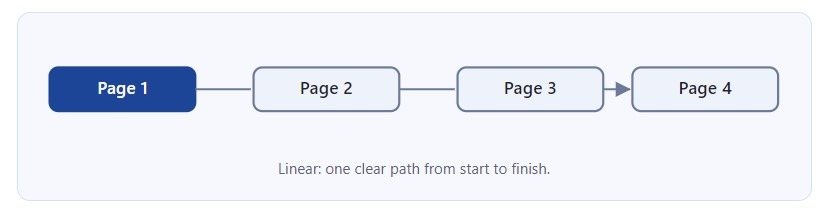
Use it for online forms, checkout processes, tutorials, and onboarding. For example, a store checkout usually has cart, delivery, payment, and confirmation. Because the path is clear, fewer visitors get lost. The weakness is freedom. Visitors cannot jump to the page they want. If the path is long, many people leave before the end. Always show a progress bar and add a back button.
2. Hierarchical Structure
The hierarchical structure is the most common. It looks like a family tree. The home page is at the top. Below it are main categories, and below them are smaller pages. Each page has one parent and may have several children. Visitors go from general information to specific information.
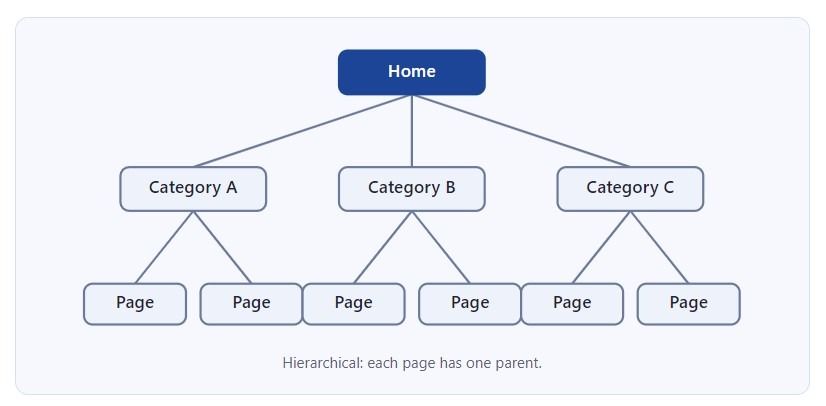
This structure is clear and easy to manage. It also works well for SEO, because search engines can see which pages are most important. Use it for company websites, blogs, and online stores. For example, a store may have Home, then Kitchen, then Blenders. The main risk is depth. If a page is more than three or four clicks from the home page, visitors may never find it. Use simple category names and add breadcrumbs, so people always know where they are.
3. Flat Structure
A flat structure has very few levels. Most pages link directly from the home page, and there are almost no sub-pages. Visitors reach any page in one click. This makes the website fast to understand and simple to build.
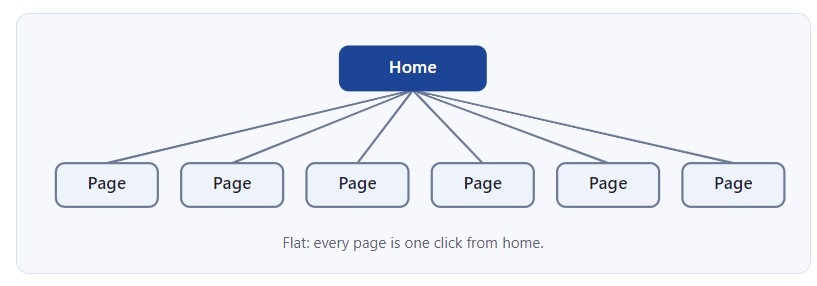
Use it for small websites, such as a portfolio, a restaurant, or a local service business. A plumber, for example, may only need Home, Services, About, Reviews, Pricing, and Contact. The problem appears when the site grows. With twenty or thirty pages, the main menu becomes crowded and visitors feel confused. Search engines also cannot see which pages are more important. If your flat site starts to grow, move to a hierarchy before the menu becomes too long.
4. Hub-and-Spoke Structure
In a hub-and-spoke structure, one central page connects to many related pages, called spokes. Each spoke links back to the hub, and the spokes usually do not link to each other. The hub is a complete guide to a big topic. The spokes explain smaller parts of that topic in detail.
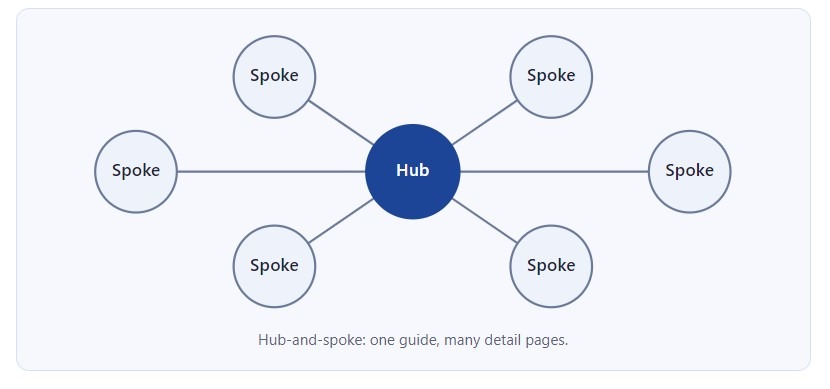
Content marketers like this model because it builds topic authority. For example, a hub called Appliance Repair Guide can link to spokes about fridge faults, washing machine errors, and oven problems. Visitors read the summary first, then choose the detail they need. Search engines also see that the pages belong together. The weakness is the hub itself. If it is weak or old, the whole group suffers. Update the hub regularly and make sure every spoke links back to it.
5. Network Structure
A network structure, also called a web, lets pages link to many other pages. There is no strict top or bottom. Links follow the topic, not a menu. Wikipedia is the best-known example: one article links to dozens of others.
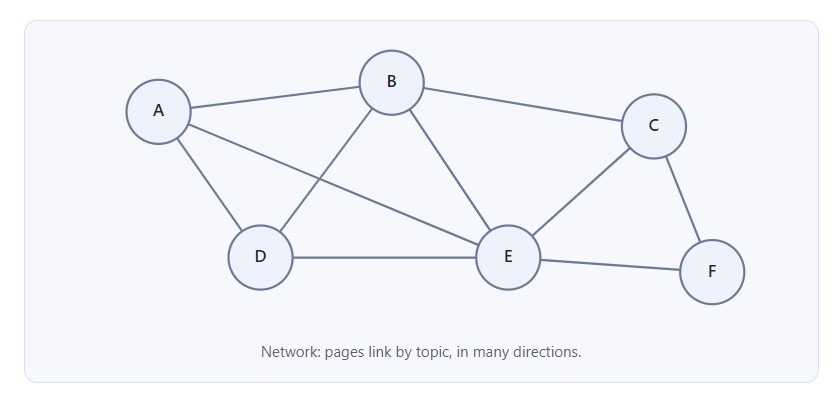
This structure is excellent for exploration. Visitors follow their interest from page to page, so they stay longer and see more content. Use it for encyclopedias, news archives, large blogs, and learning sites. The difficulty is control. Without a clear plan, some pages become orphans, and links become random. Visitors can feel lost because there is no obvious path back. Use a good search box, related-article blocks, and regular link checks. Many sites combine a network of internal links with a simple hierarchy for the main menu.
6. Matrix Structure
A matrix structure gives visitors two or more ways to reach the same content, for example by topic or by audience. Imagine a training website. One student chooses Accounting first, then Beginner level. Another student chooses Beginner first, then Accounting. Both arrive at the same page.
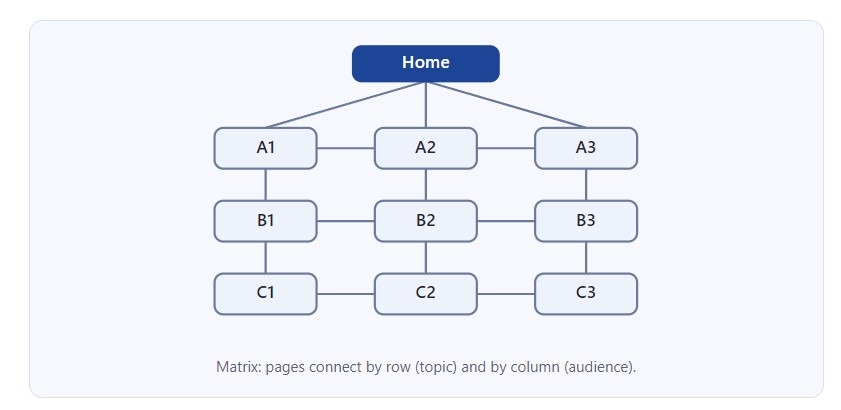
This is useful when users have different needs. Universities, government portals, and large online stores use matrix navigation. Filters and tags are a modern version of this idea. The cost is complexity. You need careful planning, consistent labels, and often a database or CMS to manage the links. If two routes lead to the same page, use canonical tags, or search engines may see duplicate content.
Comparing the Structures
| Structure | Best for | Main risk |
|---|---|---|
| Linear | Checkout, tutorials | Visitors cannot skip |
| Hierarchical | Business sites, shops | Pages too deep |
| Flat | Small sites | Crowded menu |
| Hub-and-spoke | Topic guides, SEO | Weak hub page |
| Network | Large content libraries | Orphan pages |
| Matrix | Many user types | Complex setup |
How to Choose
Ask three simple questions. First, how many pages do you have now, and how many will you have next year? Second, what do your visitors want to do? Third, how will you keep the content updated?
A small business with ten pages can use a flat structure. A company with many services should use a hierarchy. If you publish many articles on the same subjects, add hub-and-spoke groups. Large libraries usually need network links and filters. Most real websites mix two or three structures. For example, a hierarchy may have a linear checkout inside it.
Here is a short example. Imagine an appliance repair company. It starts with a flat site of six pages. After one year, it offers twelve services in many areas. The owner changes to a hierarchy: Home, Services, then each appliance. Later, the team writes a guide for each appliance and links the guide to its repair pages. This creates hub-and-spoke groups inside the hierarchy. The structure grows step by step, and each change solves a real problem.
Before you build, test your plan. Draw the pages on paper. Ask real users where they would click to find a task. If they hesitate, change the structure, not the visitor.
Practical Tips for Any Structure
Some rules work for every website, whatever shape you choose. Keep your main menu short, with five to seven items. Use clear names that visitors already know, such as Services, Pricing, and Contact. Link important pages from the home page, because search engines give more attention to pages that are close to it. Use internal links inside your text to connect related pages.
Also, keep your URLs tidy. A URL like /services/fridge-repair/ shows the structure and is easy to read. Finally, review your site every few months. Remove old pages, fix broken links, and check that no page is hidden without a link. A structure is not a one-time decision. It is a plan that you improve over time.
Website structure is the foundation of a good user experience. It affects how people move, how long they stay, and how search engines read your site. Choose the simplest shape that fits your content, keep important pages close to the home page, and review the plan as your website grows.